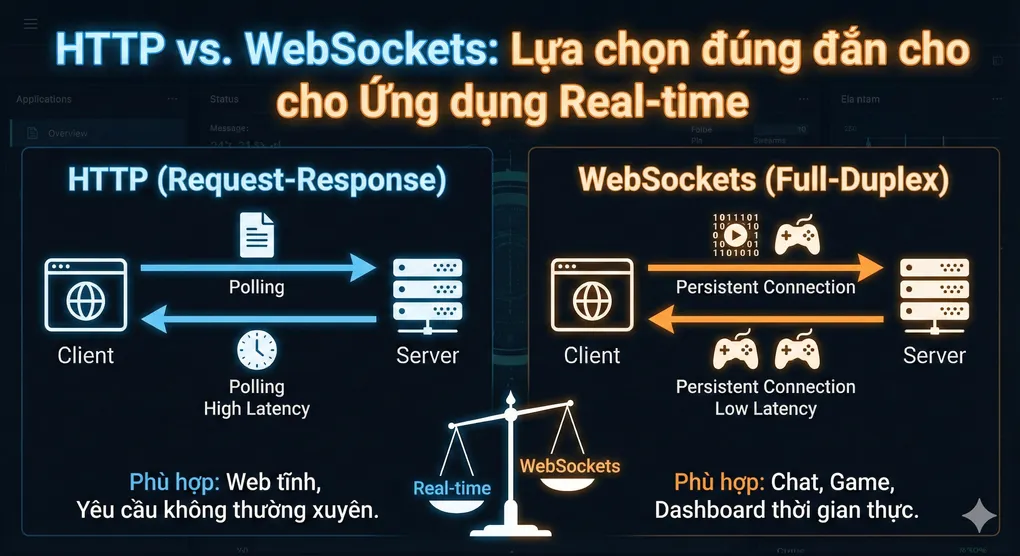
HTTP vs WebSockets: Lựa chọn đúng đắn cho Ứng dụng Real-time
Giới thiệu
Trong thời đại mà người dùng mong đợi trải nghiệm tức thời - từ tin nhắn chat đến cập nhật giá cổ phiếu - việc lựa chọn giao thức truyền thông phù hợp có thể quyết định sự thành bại của ứng dụng. Là một Senior Software Engineer, tôi đã trải qua không ít dự án phải “refactor lại toàn bộ communication layer” chỉ vì ban đầu chọn sai công nghệ.
Hôm nay, chúng ta sẽ cùng đi sâu vào HTTP và WebSockets - hai giao thức phổ biến nhất cho ứng dụng web hiện đại. Bạn sẽ hiểu rõ khi nào nên dùng cái gì, và quan trọng hơn, tại sao.
Khái niệm Cốt lõi
HTTP: Mô hình Request-Response Truyền thống
HTTP (HyperText Transfer Protocol) là xương sống của World Wide Web. Nó hoạt động theo mô hình request-response:
- Client gửi một HTTP request
- Server xử lý và trả về HTTP response
- Kết nối đóng lại (HTTP/1.1 có keep-alive, nhưng vẫn là stateless)
Analogy: Hãy tưởng tượng HTTP như việc bạn gửi thư cho một người bạn. Mỗi lần muốn biết tin tức, bạn phải viết thư hỏi, đợi bưu điện gửi đi, người bạn nhận được, viết thư trả lời, và bưu điện gửi lại cho bạn. Quá trình này lặp lại mỗi khi bạn muốn thông tin mới.
Đặc điểm quan trọng:
- Stateless: Mỗi request độc lập, server không “nhớ” request trước đó
- Unidirectional: Chỉ client mới có thể khởi tạo request
- Overhead: Mỗi request mang theo headers đầy đủ (cookies, auth, etc.)
WebSockets: Kết nối Persistent Full-duplex
WebSockets là một giao thức khác hoàn toàn, thiết lập một kết nối hai chiều liên tục giữa client và server.
Analogy: WebSockets giống như một cuộc gọi điện thoại. Sau khi kết nối được thiết lập, cả hai bên có thể nói và nghe bất cứ lúc nào mà không cần “gọi lại” mỗi lần muốn truyền thông tin.
Đặc điểm quan trọng:
- Stateful: Kết nối duy trì liên tục
- Bidirectional: Cả client và server đều có thể gửi dữ liệu bất cứ lúc nào
- Low Latency: Không có overhead của HTTP headers cho mỗi message
- Frame-based: Dữ liệu được gửi dưới dạng frames nhẹ
Technical Deep Dive
HTTP Request Lifecycle
Hãy xem chi tiết những gì xảy ra trong một HTTP request:
1. OSI Layer Perspective:
Layer 7 (Application): HTTP Request/Response
Layer 6 (Presentation): SSL/TLS Encryption (HTTPS)
Layer 5 (Session): TCP Session Management
Layer 4 (Transport): TCP (Reliable) hoặc UDP (HTTP/3-QUIC)
Layer 3 (Network): IP Routing
Layer 2 (Data Link): Ethernet/WiFi
Layer 1 (Physical): Cables/Radio Waves
2. HTTP Request Flow:
1. DNS Lookup: example.com → 192.168.1.1
2. TCP Handshake (3-way):
   - Client: SYN
   - Server: SYN-ACK
   - Client: ACK
3. TLS Handshake (nếu HTTPS):
   - ClientHello, ServerHello, Certificate Exchange
   - Key Exchange (khoảng 1-2 RTT thêm)
4. HTTP Request được gửi
5. Server processing
6. HTTP Response trả về
7. Connection đóng (hoặc keep-alive cho request tiếp theo)
Overhead Analysis: Một HTTP request điển hình có:
- Headers: 500-800 bytes (Cookie, User-Agent, Accept, etc.)
- TCP Overhead: 20 bytes per packet
- TLS Overhead: ~5-10% bandwidth
- Latency: Mỗi request = 1 RTT minimum (Round Trip Time)
WebSocket Lifecycle
1. WebSocket Handshake (HTTP Upgrade):
GET /chat HTTP/1.1
Host: example.com
Upgrade: websocket
Connection: Upgrade
Sec-WebSocket-Key: dGhlIHNhbXBsZSBub25jZQ==
Sec-WebSocket-Version: 13

HTTP/1.1 101 Switching Protocols
Upgrade: websocket
Connection: Upgrade
Sec-WebSocket-Accept: s3pPLMBiTxaQ9kYGzzhZRbK+xOo=
[Insert Sequence Diagram: WebSocket Handshake Process]
2. Data Frame Structure:
WebSocket sử dụng binary frames rất nhẹ:
 0                   1                   2                   3
 0 1 2 3 4 5 6 7 8 9 0 1 2 3 4 5 6 7 8 9 0 1 2 3 4 5 6 7 8 9 0 1
+-+-+-+-+-------+-+-------------+-------------------------------+
|F|R|R|R| opcode|M| Payload len |    Extended payload length    |
|I|S|S|S|  (4)  |A|     (7)     |             (16/64)           |
|N|V|V|V|       |S|             |   (if payload len==126/127)   |
| |1|2|3|       |K|             |                               |
+-+-+-+-+-------+-+-------------+ - - - - - - - - - - - - - - - +
|     Extended payload length continued, if payload len == 127  |
+ - - - - - - - - - - - - - - - +-------------------------------+
|                               | Masking-key (if MASK set to 1)|
+-------------------------------+-------------------------------+
|                      Payload Data                             |
+---------------------------------------------------------------+
Frame Overhead: Chỉ 2-14 bytes (so với 500-800 bytes của HTTP headers)!
3. Persistent Connection:
Sau khi handshake, connection được giữ mở:
- Không cần DNS lookup lại
- Không cần TCP handshake lại
- Không cần TLS handshake lại
- PING/PONG frames để giữ connection alive
Code Implementation
Ví dụ 1: HTTP Polling (Traditional Approach)
Client Side (TypeScript/React):
// ❌ Cách tiếp cận kém hiệu quả cho real-time
import { useEffect, useState } from 'react';

const usePolling = (url: string, interval: number = 5000) => {
  const [data, setData] = useState<any>(null);
  const [loading, setLoading] = useState(false);

  useEffect(() => {
    const fetchData = async () => {
      setLoading(true);
      try {
        const response = await fetch(url, {
          method: 'GET',
          headers: {
            'Content-Type': 'application/json',
            'Authorization': `Bearer ${localStorage.getItem('token')}`
          }
        });
        const result = await response.json();
        setData(result);
      } catch (error) {
        console.error('Polling error:', error);
      } finally {
        setLoading(false);
      }
    };

    // Poll ngay lập tức
    fetchData();

    // Sau đó poll mỗi 5 giây
    const intervalId = setInterval(fetchData, interval);

    return () => clearInterval(intervalId);
  }, [url, interval]);

  return { data, loading };
};

// Sử dụng
const StockPriceTracker = () => {
  const { data: stockData } = usePolling('/api/stock-prices', 3000);

  return (
    <div>
      <h2>Current Price: ${stockData?.price}</h2>
    </div>
  );
};
Server Side (NestJS):
// stock-price.controller.ts
import { Controller, Get, UseGuards } from '@nestjs/common';
import { JwtAuthGuard } from './auth/jwt-auth.guard';

@Controller('api/stock-prices')
export class StockPriceController {
  constructor(private readonly stockService: StockPriceService) {}

  @Get()
  @UseGuards(JwtAuthGuard)
  async getCurrentPrices() {
    // Mỗi request phải:
    // 1. Validate JWT token
    // 2. Query database
    // 3. Format response
    // 4. Gửi lại toàn bộ headers

    return await this.stockService.getPrices();
  }
}
Vấn đề với HTTP Polling:
- ⚠️ Wasted Bandwidth: 90% requests không có dữ liệu mới
- ⚠️ Server Load: Hàng nghìn clients polling = DDoS tự gây
- ⚠️ Delayed Updates: Latency = polling interval / 2 (trung bình)
- ⚠️ Battery Drain: Mobile devices gửi requests liên tục
Ví dụ 2: WebSocket Implementation (Modern Approach)
Server Side (NestJS WebSocket Gateway):
// stock-price.gateway.ts
import {
  WebSocketGateway,
  WebSocketServer,
  SubscribeMessage,
  OnGatewayConnection,
  OnGatewayDisconnect,
  MessageBody,
  ConnectedSocket,
} from '@nestjs/websockets';
import { Server, Socket } from 'socket.io';
import { UseGuards } from '@nestjs/common';
import { WsJwtGuard } from './auth/ws-jwt.guard';

@WebSocketGateway({
  cors: {
    origin: process.env.CLIENT_URL,
    credentials: true,
  },
  namespace: '/stock-prices',
})
export class StockPriceGateway
  implements OnGatewayConnection, OnGatewayDisconnect {

  @WebSocketServer()
  server: Server;

  private subscribedSymbols: Map<string, Set<string>> = new Map();

  constructor(private readonly stockService: StockPriceService) {
    // Simulate real-time price updates
    this.startPriceUpdates();
  }

  @UseGuards(WsJwtGuard)
  async handleConnection(client: Socket) {
    console.log(`Client connected: ${client.id}`);

    // Send initial data
    const initialPrices = await this.stockService.getAllPrices();
    client.emit('initial-prices', initialPrices);
  }

  handleDisconnect(client: Socket) {
    console.log(`Client disconnected: ${client.id}`);

    // Cleanup subscriptions
    this.subscribedSymbols.forEach((clients, symbol) => {
      clients.delete(client.id);
      if (clients.size === 0) {
        this.subscribedSymbols.delete(symbol);
      }
    });
  }

  @SubscribeMessage('subscribe-symbol')
  @UseGuards(WsJwtGuard)
  handleSubscribeSymbol(
    @MessageBody() symbol: string,
    @ConnectedSocket() client: Socket,
  ) {
    if (!this.subscribedSymbols.has(symbol)) {
      this.subscribedSymbols.set(symbol, new Set());
    }
    this.subscribedSymbols.get(symbol)!.add(client.id);

    console.log(`Client ${client.id} subscribed to ${symbol}`);
  }

  @SubscribeMessage('unsubscribe-symbol')
  handleUnsubscribeSymbol(
    @MessageBody() symbol: string,
    @ConnectedSocket() client: Socket,
  ) {
    const clients = this.subscribedSymbols.get(symbol);
    if (clients) {
      clients.delete(client.id);
      if (clients.size === 0) {
        this.subscribedSymbols.delete(symbol);
      }
    }
  }

  private startPriceUpdates() {
    // Giả lập real-time price feed
    setInterval(async () => {
      const updatedPrices = await this.stockService.getUpdatedPrices();

      updatedPrices.forEach((priceData) => {
        const clients = this.subscribedSymbols.get(priceData.symbol);

        if (clients && clients.size > 0) {
          // ✅ Chỉ gửi cho clients đã subscribe
          // ✅ Chỉ gửi data thay đổi, không phải toàn bộ headers
          clients.forEach((clientId) => {
            this.server.to(clientId).emit('price-update', {
              symbol: priceData.symbol,
              price: priceData.price,
              change: priceData.change,
              timestamp: Date.now(),
            });
          });
        }
      });
    }, 1000); // Update mỗi 1 giây
  }
}
Client Side (TypeScript/React with Socket.IO):
// useStockWebSocket.ts
import { useEffect, useState, useRef } from 'react';
import { io, Socket } from 'socket.io-client';

interface StockPrice {
  symbol: string;
  price: number;
  change: number;
  timestamp: number;
}

export const useStockWebSocket = (symbols: string[]) => {
  const [prices, setPrices] = useState<Map<string, StockPrice>>(new Map());
  const [connected, setConnected] = useState(false);
  const socketRef = useRef<Socket | null>(null);

  useEffect(() => {
    // Khởi tạo WebSocket connection
    const socket = io('http://localhost:3000/stock-prices', {
      auth: {
        token: localStorage.getItem('token'),
      },
      transports: ['websocket'], // Force WebSocket, không fallback polling
      reconnection: true,
      reconnectionDelay: 1000,
      reconnectionAttempts: 5,
    });

    socketRef.current = socket;

    // Event handlers
    socket.on('connect', () => {
      console.log('✅ WebSocket connected');
      setConnected(true);

      // Subscribe to symbols
      symbols.forEach((symbol) => {
        socket.emit('subscribe-symbol', symbol);
      });
    });

    socket.on('disconnect', () => {
      console.log('❌ WebSocket disconnected');
      setConnected(false);
    });

    socket.on('initial-prices', (initialData: StockPrice[]) => {
      const priceMap = new Map<string, StockPrice>();
      initialData.forEach((item) => {
        priceMap.set(item.symbol, item);
      });
      setPrices(priceMap);
    });

    socket.on('price-update', (update: StockPrice) => {
      setPrices((prev) => {
        const newMap = new Map(prev);
        newMap.set(update.symbol, update);
        return newMap;
      });
    });

    socket.on('error', (error) => {
      console.error('WebSocket error:', error);
    });

    // Cleanup
    return () => {
      symbols.forEach((symbol) => {
        socket.emit('unsubscribe-symbol', symbol);
      });
      socket.disconnect();
    };
  }, [symbols]);

  return { prices, connected };
};

// Sử dụng trong component
const StockDashboard = () => {
  const symbols = ['AAPL', 'GOOGL', 'MSFT', 'TSLA'];
  const { prices, connected } = useStockWebSocket(symbols);

  return (
    <div className="stock-dashboard">
      <div className="connection-status">
        {connected ? '🟢 Live' : '🔴 Disconnected'}
      </div>

      {symbols.map((symbol) => {
        const price = prices.get(symbol);
        return price ? (
          <div key={symbol} className="stock-card">
            <h3>{symbol}</h3>
            <p className="price">${price.price.toFixed(2)}</p>
            <p className={price.change >= 0 ? 'positive' : 'negative'}>
              {price.change >= 0 ? '▲' : '▼'} {Math.abs(price.change).toFixed(2)}%
            </p>
            <small>Updated: {new Date(price.timestamp).toLocaleTimeString()}</small>
          </div>
        ) : (
          <div key={symbol}>Loading {symbol}...</div>
        );
      })}
    </div>
  );
};
Ví dụ 3: Hybrid Approach (Best of Both Worlds)
Trong thực tế, nhiều ứng dụng enterprise sử dụng hybrid approach:
// message.service.ts - Chat Application
import { Injectable } from '@nestjs/common';
import { WebSocketGateway } from '@nestjs/websockets';

@Injectable()
export class MessageService {

  // WebSocket cho real-time delivery
  async sendRealtimeMessage(userId: string, message: any) {
    // Gửi qua WebSocket nếu user đang online
    this.websocketGateway.sendToUser(userId, message);
  }

  // HTTP endpoint cho message history
  async getMessageHistory(conversationId: string, page: number = 1) {
    // Pagination, caching, etc.
    return await this.messageRepository.find({
      where: { conversationId },
      skip: (page - 1) * 50,
      take: 50,
      order: { timestamp: 'DESC' },
    });
  }

  // HTTP endpoint cho gửi message (có retry, persistence)
  async sendMessage(senderId: string, recipientId: string, content: string) {
    // 1. Save to database (persistence)
    const message = await this.messageRepository.save({
      senderId,
      recipientId,
      content,
      timestamp: new Date(),
      delivered: false,
    });

    // 2. Try real-time delivery
    try {
      await this.sendRealtimeMessage(recipientId, message);
      message.delivered = true;
      await this.messageRepository.save(message);
    } catch (error) {
      // User offline, sẽ nhận khi reconnect
      console.log('User offline, message queued');
    }

    return message;
  }
}
Khi nào dùng approach nào?
| Use Case | Recommended Protocol | Lý do |
|---|---|---|
| Chat Messages | WebSocket | Real-time bidirectional, low latency |
| Message History | HTTP | Pagination, caching, không cần real-time |
| File Upload | HTTP | Large payloads, need progress, retry |
| Live Notifications | WebSocket | Push from server, instant delivery |
| User Profile Update | HTTP | Infrequent, stateless, RESTful |
| Live Dashboard | WebSocket | Continuous updates, many concurrent changes |
| Search API | HTTP | Stateless, cacheable, idempotent |
| Collaborative Editing | WebSocket | Ultra-low latency, operational transforms |
So sánh Hiệu suất
Bandwidth Consumption Test
Scenario: 1000 concurrent users tracking 5 stock symbols, updates mỗi 1 giây
HTTP Polling (3 second interval):
Requests/second = 1000 users * (1 request / 3 seconds) = 333 req/s
Data per request = 800 bytes headers + 200 bytes payload = 1000 bytes
Bandwidth = 333 req/s * 1000 bytes * 8 bits = 2.66 Mbps
Monthly data = 2.66 Mbps * 86400 sec/day * 30 days = 8.6 TB
WebSocket:
Initial connection = 1000 connections * 1KB handshake = 1 MB (one-time)
Updates/second = 5 symbols * 1 update/sec = 5 updates/sec (broadcast to all)
Data per update = 14 bytes frame header + 50 bytes payload = 64 bytes
Bandwidth = 5 updates/s * 1000 users * 64 bytes * 8 bits = 2.56 Mbps
Monthly data = 2.56 Mbps * 86400 * 30 = 8.3 TB
Nhưng khoan đã! WebSocket có optimizations:
// Server-side optimization: Chỉ gửi khi có thay đổi
private sendUpdatesIfChanged() {
  const currentPrices = this.getCurrentPrices();
  const changedSymbols = this.getChangedSymbols(currentPrices);

  // ✅ Chỉ gửi 10% symbols có thay đổi
  changedSymbols.forEach(symbol => {
    this.broadcastUpdate(symbol, currentPrices[symbol]);
  });
}

// Actual bandwidth = 2.56 Mbps * 0.1 = 0.256 Mbps
// Monthly data = 0.83 TB (10x reduction!)
Latency Comparison
[Insert Performance Chart: HTTP Polling vs WebSocket Latency]
HTTP Polling Average Latency:
- Best case: 0ms (update arrives right when polling)
- Worst case: polling_interval (update just missed)
- Average: polling_interval / 2 = 1.5 seconds (với 3s interval)
WebSocket Average Latency:
- Network RTT: ~50ms (typical)
- Processing time: ~10ms
- Average: ~60ms (25x faster!)
Kết luận
Việc lựa chọn giữa HTTP và WebSockets không phải là “cái nào tốt hơn”, mà là “cái nào phù hợp hơn” cho từng use case cụ thể.
Chọn HTTP khi:
- ✅ Dữ liệu không thay đổi thường xuyên
- ✅ Cần caching, load balancing dễ dàng (HTTP proxies rất mature)
- ✅ Stateless architecture quan trọng (microservices, serverless)
- ✅ SEO, crawling, API documentation (RESTful)
Chọn WebSockets khi:
- ✅ Latency < 100ms là critical (gaming, trading, collaboration)
- ✅ Server cần push data (notifications, live feeds)
- ✅ Bidirectional communication liên tục (chat, video calls)
- ✅ Tiết kiệm bandwidth cho high-frequency updates
Sử dụng Hybrid khi:
- ✅ Application phức tạp với nhiều use cases khác nhau
- ✅ Cần fallback mechanism (WebSocket fail → HTTP polling)
- ✅ Large payloads (HTTP) + Real-time notifications (WebSocket)
Lời khuyên cuối cùng
Trong 8 năm làm việc với real-time systems, tôi học được rằng: “Premature optimization is the root of all evil” (Donald Knuth). Hãy bắt đầu với HTTP nếu bạn chưa chắc chắn. Khi bạn đo được metrics và thấy bottleneck, hãy migrate sang WebSockets cho những phần cần thiết.
Và quan trọng nhất: Monitor everything. Dùng tools như Prometheus, Grafana để track:
- WebSocket connection count
- Message throughput
- Reconnection rate
- Memory usage per connection
Happy coding! 🚀
Tài liệu tham khảo:
- RFC 6455: The WebSocket Protocol
- MDN Web Docs: WebSockets API
- NestJS Official Documentation: WebSocket Gateways
- Socket.IO Documentation
Về tác giả: Senior Software Engineer với 8+ năm kinh nghiệm xây dựng distributed systems và real-time applications. Đam mê chia sẻ kiến thức về system architecture và performance optimization.