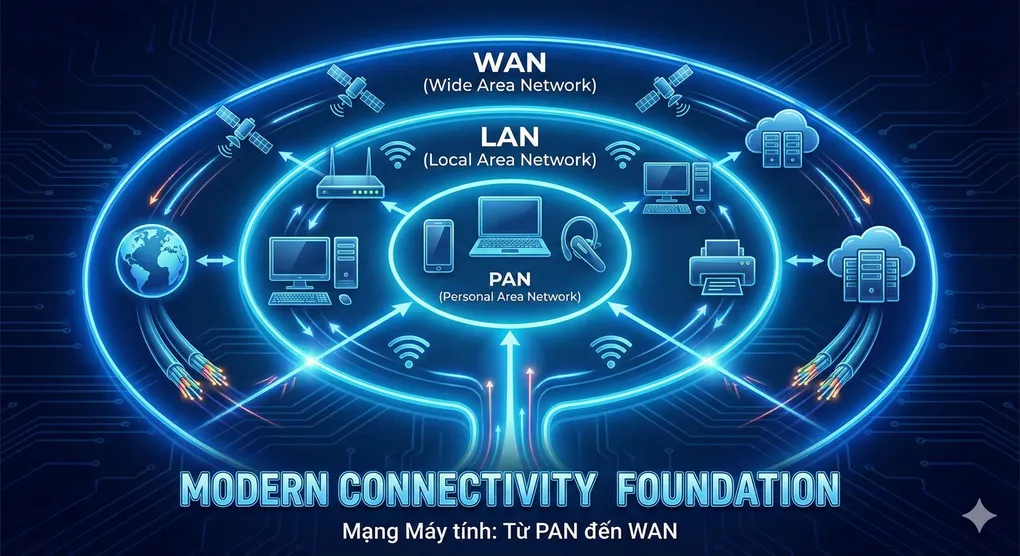
Mạng Máy tính: Từ PAN đến WAN - Nền tảng của Kết nối Hiện đại
Giới thiệu
Mỗi ngày, chúng ta sử dụng hàng chục loại mạng khác nhau mà không hề nhận ra. Từ Bluetooth kết nối tai nghe (PAN), WiFi ở nhà (LAN), mạng công ty (MAN), cho đến Internet toàn cầu (WAN) - tất cả đều là các loại Computer Networks với mục đích và quy mô khác nhau.
Trong 10 năm làm việc với infrastructure và network engineering, tôi nhận ra rằng hiểu rõ sự khác biệt giữa các loại mạng này không chỉ giúp bạn design systems tốt hơn, mà còn debug nhanh hơn, và quan trọng nhất - chọn đúng technology cho đúng use case.
Hôm nay, chúng ta sẽ đi từ cơ bản nhất - khái niệm mạng máy tính - đến chi tiết các loại mạng theo quy mô địa lý, và cuối cùng là giao thức mạng - ngôn ngữ mà các máy tính sử dụng để “nói chuyện” với nhau.
Khái niệm Mạng Máy tính
Định nghĩa
Mạng máy tính (Computer Network) là một hệ thống gồm hai hoặc nhiều thiết bị (computers, servers, routers, switches…) được kết nối với nhau để:
- Chia sẻ tài nguyên: Files, printers, storage, bandwidth
- Trao đổi dữ liệu: Messages, emails, files, streams
- Cung cấp dịch vụ: Web hosting, databases, applications
Analogy của Hệ thống Giao thông:
Mạng máy tính giống như hệ thống giao thông:
- Thiết bị = Các tòa nhà/địa điểm
- Cables/Wireless = Đường phố/cao tốc
- Routers = Bảng chỉ đường/GPS
- Switches = Ngã tư/vòng xoay
- Data = Xe cộ/người di chuyển
- Protocols = Luật giao thông
Thành phần Cơ bản
1. Network Devices (Thiết bị):
End Devices:
- Computers (Desktop, Laptop)
- Mobile Devices (Phone, Tablet)
- Servers (Web, Database, File)
- IoT Devices (Sensors, Smart Home)

Intermediary Devices:
- Router: Định tuyến giữa các mạng khác nhau
- Switch: Kết nối thiết bị trong cùng một mạng
- Access Point: WiFi connectivity
- Firewall: Security gateway
- Load Balancer: Phân phối traffic
2. Network Media (Phương tiện truyền):
Wired:
- Ethernet Cable (Cat5e, Cat6, Cat6a)
  * Speed: 1 Gbps - 10 Gbps
  * Distance: 100m maximum

- Fiber Optic Cable
  * Speed: 10 Gbps - 100 Gbps+
  * Distance: 40km - 100km+
  * Types: Single-mode, Multi-mode

Wireless:
- WiFi (802.11a/b/g/n/ac/ax)
  * Frequency: 2.4 GHz, 5 GHz, 6 GHz
  * Speed: 54 Mbps - 9.6 Gbps

- Bluetooth
  * Speed: 1-3 Mbps
  * Range: 10-100m

- Cellular (4G, 5G)
  * Speed: 100 Mbps - 10 Gbps
  * Range: Kilometers
3. Network Protocols (Giao thức):
- Tập hợp các quy tắc để thiết bị giao tiếp
- Chúng ta sẽ đi sâu vào phần sau!
Topology (Cấu trúc Mạng)
1. Bus Topology:
Device 1 --- Device 2 --- Device 3 --- Device 4
     |            |            |            |
     +------------+------------+------------+
              Single Cable (Bus)

Ưu điểm: Dễ setup, ít cable
Nhược điểm: Nếu cable chính đứt → toàn bộ mạng down
Use case: Legacy networks (hiếm khi dùng nữa)
2. Star Topology:
        Device 1
            |
Device 4 - Switch - Device 2
            |
        Device 3

Ưu điểm: Dễ troubleshoot, một device lỗi không ảnh hưởng khác
Nhược điểm: Switch down = toàn bộ mạng down
Use case: Modern LANs (phổ biến nhất)
3. Ring Topology:
Device 1 → Device 2
   ↑           ↓
Device 4 ← Device 3

Ưu điểm: Equal access, predictable performance
Nhược điểm: Một device lỗi có thể đứt vòng
Use case: FDDI, Token Ring (legacy)
4. Mesh Topology:
Device 1 ←→ Device 2
   ↕     ×  ↕     ×
Device 3 ←→ Device 4

Ưu điểm: Redundancy cao, fault-tolerant
Nhược điểm: Phức tạp, nhiều cables, đắt
Use case: WANs, Internet backbone
[Insert Diagram: Network Topologies Comparison]
Phân loại Mạng theo Quy mô Địa lý
1. PAN - Personal Area Network
Định nghĩa: Mạng cá nhân, kết nối các thiết bị xung quanh một người (trong phạm vi vài mét).
Đặc điểm:
- Phạm vi: 1-10 meters
- Công nghệ: Bluetooth, USB, Infrared, NFC
- Tốc độ: 1-3 Mbps (Bluetooth), 480 Mbps (USB 2.0)
- Mục đích: Kết nối thiết bị cá nhân
Ví dụ thực tế:
PAN của bạn hiện tại:
- Laptop kết nối với:
  * Bluetooth Mouse
  * Bluetooth Headphones
  * Smartphone (tethering)
  * Smartwatch
  * USB External Hard Drive
  * Wireless Keyboard
Use Cases:
- 🎧 Audio streaming (headphones, speakers)
- ⌚ Wearable devices sync
- 📱 Phone-to-laptop file transfer
- 🖨️ Wireless printing
- 🎮 Game controllers
Cách hoạt động của PAN:
Khi bạn bật Bluetooth trên điện thoại để tìm tai nghe, quá trình diễn ra như sau:
- Discovery Phase: Điện thoại phát tín hiệu “ping” xung quanh trong phạm vi 10m
- Response Phase: Các thiết bị Bluetooth gần đó phản hồi với thông tin: tên, địa chỉ MAC, loại device
- Pairing Phase: Bạn chọn device và nhập mã PIN (nếu cần) để kết nối
- Connection Phase: Hai thiết bị tạo kết nối bảo mật và bắt đầu truyền dữ liệu
Ví dụ thực tế:
Bluetooth Device Discovery:
- Tìm thấy: "AirPods Pro" (Audio Device)
- Tìm thấy: "Magic Mouse" (Peripheral)
- Tìm thấy: "iPhone 15" (Phone)
- Khoảng cách: 2-8 meters
- Thời gian scan: 5-10 giây
Security Note: PAN devices thường kém secure hơn vì:
- Bluetooth có vulnerabilities (BlueBorne, KNOB)
- USB có thể bị BadUSB attacks
- NFC có limited range nhưng vẫn có thể bị sniff
2. LAN - Local Area Network
Định nghĩa: Mạng cục bộ, kết nối các thiết bị trong một khu vực nhỏ (nhà, văn phòng, trường học).
Đặc điểm:
- Phạm vi: 10m - 1km (typically < 500m)
- Công nghệ: Ethernet (wired), WiFi (wireless)
- Tốc độ: 100 Mbps - 10 Gbps
- Ownership: Private (thuộc về một tổ chức/cá nhân)
- Cost: Thấp đến trung bình
Ví dụ thực tế:
LAN tại Văn phòng:
┌─────────────────────────────────────┐
│          Internet Router            │
│      (Gateway to WAN)               │
└─────────────┬───────────────────────┘
              │
    ┌─────────┴─────────┐
    │   Core Switch     │
    │  (Layer 3)        │
    └───┬───────┬───────┘
        │       │
    ┌───┴───┐ ┌┴───────┐
    │Switch1│ │Switch2 │
    │Floor1 │ │Floor2  │
    └───┬───┘ └┬───────┘
        │       │
    [PCs]   [PCs+WiFi AP]
Components của LAN:
-
Router/Gateway:
- Kết nối LAN với Internet (WAN)
- NAT (Network Address Translation)
- DHCP Server (cấp IP cho devices)
- Firewall
-
Switch:
- Kết nối devices trong LAN
- Layer 2 (MAC address based)
- Layer 3 (IP routing capable)
-
Access Points:
- WiFi connectivity
- Multiple SSIDs
- Guest network isolation
LAN Configuration Example (Network Admin):
# LAN IP Addressing Scheme
Network: 192.168.1.0/24
Subnet Mask: 255.255.255.0
Available IPs: 192.168.1.1 - 192.168.1.254

# IP Allocation:
192.168.1.1       → Router/Gateway
192.168.1.2-10    → Servers (Static)
192.168.1.11-20   → Printers (Static)
192.168.1.21-50   → Important Devices (Static)
192.168.1.51-254  → DHCP Pool (Dynamic)

# DHCP Configuration
Lease Time: 24 hours
DNS Servers: 8.8.8.8, 1.1.1.1
Default Gateway: 192.168.1.1
Cách tìm devices trong LAN:
Để biết có bao nhiêu thiết bị đang kết nối trong mạng LAN của bạn, quá trình scan hoạt động như sau:
- Xác định dải IP cần scan: Ví dụ 192.168.1.1 đến 192.168.1.254 (254 địa chỉ)
- Gửi ping/connection request: Thử kết nối đến từng IP address
- Kiểm tra response: Nếu thiết bị online, nó sẽ phản hồi
- Lấy thông tin: Hostname, MAC address, open ports
Kết quả mẫu từ một mạng LAN:
LAN Scan Results (192.168.1.0/24):
✅ 192.168.1.1    → Router (Gateway)
✅ 192.168.1.100  → Desktop-PC (Port 445 open)
✅ 192.168.1.105  → Laptop-Work (Port 22 open)
✅ 192.168.1.150  → Printer-HP (Port 80 open)
✅ 192.168.1.200  → iPhone (Port 62078 open)

Tổng: 5/254 devices active
Thời gian scan: ~30 giây
LAN Performance Factors:
- Bandwidth: 100 Mbps (Fast Ethernet) vs 1 Gbps (Gigabit) vs 10 Gbps
- Latency: < 1ms typically
- Packet Loss: < 0.01% trong mạng tốt
- Collision Domain: Giảm bằng switches (thay vì hubs)
3. MAN - Metropolitan Area Network
Định nghĩa: Mạng đô thị, kết nối các LAN trong một thành phố hoặc khu vực lớn.
Đặc điểm:
- Phạm vi: 5km - 50km (toàn thành phố)
- Công nghệ: Fiber Optic, Metro Ethernet, WiMAX
- Tốc độ: 100 Mbps - 100 Gbps
- Ownership: ISP hoặc Government
- Cost: Cao
Ví dụ thực tế:
MAN của Công ty có Multiple Offices:

[Main Office] ←────────┐
   LAN 1               │
                       │
[Branch Office 1] ←────┤    MAN Ring
   LAN 2               ├─→ (Fiber Backbone)
                       │
[Branch Office 2] ←────┤
   LAN 3               │
                       │
[Data Center] ←────────┘
   LAN 4

Distance: 2-30km between sites
Technology: Fiber Optic (Dark Fiber hoặc Metro Ethernet)
Speed: 1-10 Gbps per link
MAN Technologies:
1. Metro Ethernet:
# MAN Connection Types

# Point-to-Point (E-Line)
Main_Office ←─────────→ Data_Center
Dedicated connection, full bandwidth

# Multipoint-to-Multipoint (E-LAN)
Office_A ←──┐
            ├─→ [Switch] ←─→ Office_C
Office_B ←──┘
All offices in same Layer 2 network

# Routed (E-Tree)
Main_Hub ←──┬─→ Branch_1
            ├─→ Branch_2
            └─→ Branch_3
Hub-and-spoke topology
2. SONET/SDH (Legacy but still used):
Speed Hierarchy:
OC-1/STM-1:  51.84 Mbps
OC-3/STM-1:  155.52 Mbps
OC-12/STM-4: 622.08 Mbps
OC-48/STM-16: 2.488 Gbps
OC-192/STM-64: 9.953 Gbps
Use Cases:
- 🏢 Kết nối multiple office locations
- 🏥 Hospital networks (multiple buildings)
- 🎓 University campus networks
- 🏛️ Government city-wide networks
- 📡 Cable TV distribution networks
Thiết kế MAN thực tế:
Giả sử một công ty có 3 địa điểm trong thành phố và cần kết nối chúng:
Các thành phần:
- Headquarters (HQ): Văn phòng chính - 10 Gbps bandwidth
- Data Center: Trung tâm dữ liệu - 100 Gbps bandwidth
- Branch Office: Chi nhánh - 1 Gbps bandwidth
Kết nối Fiber Optic:
[HQ] ←─5km─→ [Data Center]  (10 Gbps link, latency 2ms, $5000/tháng)
 [HQ] ←─3km─→ [Branch]       (1 Gbps link, latency 3ms, $1500/tháng)
 [DC] ←─6km─→ [Branch]       (1 Gbps link, latency 4ms, $1800/tháng)

Tổng cộng:
- 3 sites, 3 fiber links
- Total bandwidth: 12 Gbps
- Average latency: 3ms
- Chi phí: $8300/tháng
Lợi ích của MAN:
- ✅ Tốc độ cao giữa các office (Gbps)
- ✅ Độ trễ thấp (< 5ms)
- ✅ Bảo mật cao (dedicated fiber)
- ✅ SLA guarantee từ ISP
4. WAN - Wide Area Network
Định nghĩa: Mạng diện rộng, kết nối các LAN/MAN qua khoảng cách địa lý lớn (quốc gia, lục địa, toàn cầu).
Đặc điểm:
- Phạm vi: > 50km (unlimited - toàn cầu!)
- Công nghệ: Leased Lines, MPLS, Internet VPN, Satellite
- Tốc độ: 1 Mbps - 100+ Gbps
- Ownership: ISP (Internet Service Providers)
- Cost: Rất cao
- Latency: 50ms - 600ms (tùy distance)
Ví dụ thực tế - Internet là WAN lớn nhất!
Global WAN Example:

[US Office] ←────────────────────┐
   LAN                            │
                                  │
[Europe Office] ←─────────────────┤
   LAN                            ├─→ Internet/MPLS WAN
                                  │    (Global Backbone)
[Asia Office] ←───────────────────┤
   LAN                            │
                                  │
[Australia Office] ←──────────────┘
   LAN

Distance: Thousands of kilometers
Technology: Submarine Fiber Cables, Satellites
Latency:
  US ↔ Europe: ~80-120ms
  US ↔ Asia: ~150-200ms
  US ↔ Australia: ~180-250ms
WAN Technologies:
1. Leased Lines (Dedicated):
T1: 1.544 Mbps ($500-1500/month)
T3: 44.736 Mbps ($3000-10000/month)
E1: 2.048 Mbps (Europe)
E3: 34.368 Mbps (Europe)

Pros: Dedicated bandwidth, low latency, secure
Cons: Expensive, fixed capacity
2. MPLS (Multi-Protocol Label Switching):
[Site A] ──┐
           │
[Site B] ──┤
           ├──→ [MPLS Cloud] ──→ [Destinations]
[Site C] ──┤
           │
[Site D] ──┘

Features:
- QoS (Quality of Service) guaranteed
- Traffic engineering
- VPN support
- Class of Service (CoS)

Typical Speeds: 10 Mbps - 10 Gbps
Cost: $500 - $50,000/month
3. Internet VPN (Site-to-Site):
[Office A]──[Firewall]──[Internet]──[Firewall]──[Office B]
              └─ VPN Tunnel (Encrypted) ─┘

Protocols: IPsec, SSL/TLS, WireGuard
Cost: Very low (just Internet cost)
Security: Encrypted end-to-end
Bandwidth: Depends on Internet connection
4. SD-WAN (Software-Defined WAN):
Modern approach: Overlay network over Internet

[Site] ──┬─→ MPLS Link (Priority traffic)
         ├─→ Internet 1 (Backup/burst)
         └─→ Internet 2 (Backup/burst)

         All managed by SD-WAN controller

Benefits:
- Cost-effective
- Automatic failover
- Dynamic path selection
- Application-aware routing
Đo latency WAN đến các server toàn cầu:
Khi bạn kết nối đến các server ở các châu lục khác nhau, độ trễ thay đổi rất nhiều:
Kết quả đo thực tế (từ Việt Nam):
WAN Latency Test Results:

📍 Singapore (AWS):        Min: 18ms  | Avg: 22ms  | Max: 28ms  → 🟢 Excellent
📍 Tokyo (Google):         Min: 65ms  | Avg: 72ms  | Max: 85ms  → 🟡 Good
📍 US West (Cloudflare):   Min: 145ms | Avg: 158ms | Max: 175ms → 🟠 Fair
📍 Europe (Azure):         Min: 220ms | Avg: 245ms | Max: 280ms → 🔴 Poor
📍 Australia (Sydney):     Min: 180ms | Avg: 195ms | Max: 215ms → 🟠 Fair

Nhận xét:
- Càng gần địa lý → Latency càng thấp
- Singapore gần nhất (1200km) → chỉ 22ms
- Europe xa nhất (9000km+) → 245ms
- Submarine fiber cables quyết định tốc độ
Hiệu suất WAN - Bandwidth-Delay Product:
Khi bandwidth cao nhưng latency cao, bạn cần TCP window size lớn:
Công thức: BDP = Bandwidth × Round-Trip Time (RTT)
Ví dụ:

1 Gbps link, latency 10ms:
  BDP = 1000 Mbps × 0.01s = 10 Mb = 1.25 MB
  → Cần TCP window ~1.2 MB

1 Gbps link, latency 100ms:
  BDP = 1000 Mbps × 0.1s = 100 Mb = 12.5 MB
  → Cần TCP window ~12 MB (đòi hỏi cao!)

10 Gbps link, latency 100ms:
  BDP = 10000 Mbps × 0.1s = 1000 Mb = 125 MB
  → Cần TCP window ~120 MB (rất lớn!)
Ý nghĩa: Nếu TCP window quá nhỏ, bandwidth bị lãng phí dù link nhanh!
Typical WAN Latencies:
📍 Cùng thành phố (< 50km):     1-5ms   → Giống LAN
📍 Cùng quốc gia (< 500km):     10-30ms  → Rất tốt
📍 Cùng châu lục (< 3000km):   30-80ms  → Tốt
📍 Xuyên lục địa (> 5000km):  100-300ms → Acceptable
🛫 Vệ tinh (Satellite):          500-600ms → Chậm
Giao thức Mạng (Network Protocols)
Khái niệm Giao thức
Network Protocol là tập hợp các quy tắc và format để các thiết bị mạng giao tiếp với nhau.
Analogy của Ngôn ngữ:
- Hai người muốn nói chuyện cần cùng ngôn ngữ (Tiếng Việt, English)
- Hai máy tính muốn giao tiếp cần cùng protocol (TCP, HTTP, FTP)
OSI Model - 7 Layers
Framework để hiểu protocols:
Layer 7: Application    → HTTP, FTP, SMTP, DNS
         ↓
Layer 6: Presentation   → SSL/TLS, JPEG, MPEG
         ↓
Layer 5: Session        → NetBIOS, RPC
         ↓
Layer 4: Transport      → TCP, UDP
         ↓
Layer 3: Network        → IP, ICMP, OSPF
         ↓
Layer 2: Data Link      → Ethernet, WiFi, PPP
         ↓
Layer 1: Physical       → Cables, Radio Waves
[Insert Diagram: OSI Model with Protocol Examples]
Các Giao thức Quan trọng
1. IP (Internet Protocol) - Layer 3:
# IPv4 Address Structure
ip_address = "192.168.1.100"

# Binary representation
binary = '.'.join([bin(int(octet))[2:].zfill(8)
                   for octet in ip_address.split('.')])

print(f"IP: {ip_address}")
print(f"Binary: {binary}")

# Output:
# IP: 192.168.1.100
# Binary: 11000000.10101000.00000001.01100100

# IPv4 Classes
classes = {
    'Class A': '1.0.0.0 - 126.255.255.255 (16M hosts)',
    'Class B': '128.0.0.0 - 191.255.255.255 (65K hosts)',
    'Class C': '192.0.0.0 - 223.255.255.255 (254 hosts)',
    'Class D': '224.0.0.0 - 239.255.255.255 (Multicast)',
    'Class E': '240.0.0.0 - 255.255.255.255 (Reserved)'
}

# Private IP Ranges (RFC 1918)
private_ranges = [
    '10.0.0.0/8',       # 16.7M addresses
    '172.16.0.0/12',    # 1M addresses
    '192.168.0.0/16'    # 65K addresses
]
2. TCP (Transmission Control Protocol) - Layer 4:
Characteristics:
✅ Connection-oriented (3-way handshake)
✅ Reliable (acknowledgments, retransmission)
✅ Ordered delivery
✅ Flow control
✅ Congestion control

Use cases: HTTP, HTTPS, FTP, SSH, Email
3. UDP (User Datagram Protocol) - Layer 4:
Characteristics:
✅ Connectionless (no handshake)
❌ Unreliable (no guarantees)
❌ Unordered
✅ Fast (low overhead)
✅ Low latency

Use cases: DNS, Gaming, Streaming, VoIP
4. HTTP/HTTPS (HyperText Transfer Protocol) - Layer 7:
# HTTP Request
GET /api/users HTTP/1.1
Host: example.com
User-Agent: Mozilla/5.0
Accept: application/json

# HTTP Response
HTTP/1.1 200 OK
Content-Type: application/json
Content-Length: 58

{"users": [{"id": 1, "name": "John"}]}
5. DNS (Domain Name System) - Layer 7:
Chức năng: Chuyển đổi domain name (google.com) thành IP address (142.250.185.46)
Cách hoạt động:
Bạn gõ: www.google.com vào browser
  ↓
1. Trình duyệt kiểm tra cache (có lưu IP rồi không?)
2. Hệ điều hành kiểm tra cache của nó
3. Hỏi DNS Resolver (thường là của ISP)
4. DNS Resolver hỏi Root Server: ".com" nằm ở đâu?
5. Root Server chỉ địch TLD Server cho .com
6. TLD Server chỉ địch Authoritative Server của google.com
7. Authoritative Server trả về: IP là 142.250.185.46
  ↓
Trình duyệt kết nối đến IP đó!

Thời gian: < 100ms (nếu chưa có trong cache)
Các loại DNS Records:
- A: IPv4 address (google.com → 142.250.185.46)
- AAAA: IPv6 address
- CNAME: Alias (www.example.com → example.com)
- MX: Mail server (gửi email đến đâu)
- TXT: Text records (xác thực domain, SPF, DKIM)
6. DHCP (Dynamic Host Configuration Protocol) - Layer 7:
Chức năng: Tự động cấp IP address cho các thiết bị mới kết nối vào mạng
Quá trình DORA (4 bước):
Thiết bị mới (laptop) kết nối vào WiFi:

1. DISCOVER (🔍 Khám phá):
   Laptop broadcast: "Tôi là thiết bị mới, cần IP!"

2. OFFER (🎁 Đề xuất):
   DHCP Server: "Tôi có IP 192.168.1.105 cho bạn"

3. REQUEST (👋 Yêu cầu):
   Laptop: "OK, tôi chấp nhận IP 192.168.1.105"

4. ACKNOWLEDGE (✅ Xác nhận):
   DHCP Server: "OK! IP này của bạn trong 24 giờ"
   Và gửi kèm:
   - Subnet Mask: 255.255.255.0
   - Gateway: 192.168.1.1
   - DNS Servers: 8.8.8.8, 1.1.1.1

→ Laptop có thể lên mạng ngay!
Tại sao cần DHCP?
- ❌ Không cần config thủ công cho từng thiết bị
- ✅ Tự động quản lý IP pool
- ✅ Tránh IP conflict
- ✅ Dễ dàng cho devices mới
7. ARP (Address Resolution Protocol) - Layer 2:
Chức năng: Chuyển IP address thành MAC address (hardware address)
Tại sao cần? Trong LAN, thiết bị gửi data bằng MAC address (không phải IP). Nên cần “dịch” IP → MAC.
Quá trình:
Máy A (192.168.1.10) muốn gửi data cho Máy B (192.168.1.20):

1. Máy A: "Tôi biết IP của B, nhưng chưa biết MAC address"

2. Máy A broadcast (gửi cho TẤT CẢ devices trong LAN):
   "Ai có IP 192.168.1.20? Cho tôi biết MAC address!"

3. Máy B reply:
   "Tôi là 192.168.1.20, MAC của tôi là AA:BB:CC:DD:EE:FF"

4. Máy A lưu vào ARP Cache (nhớ để khỏi hỏi lại):
   192.168.1.20 = AA:BB:CC:DD:EE:FF

5. Máy A gửi data trực tiếp đến MAC này

Cache thời gian: 2-20 phút (tùy OS)
Xem ARP table của máy bạn:
- Windows:
arp -a - Linux/Mac:
arp -n
Protocol Stack trong thực tế
Khi bạn sử dụng ứng dụng, nhiều protocols hoạt động cùng lúc theo “stack” (chồng lên nhau):
Các protocol stack phổ biến:
🌐 Lướt web:
   HTTP (gửi request/response)
     ↓
   TCP (đảm bảo truyền đầy đủ)
     ↓
   IP (định tuyến giữa mạng)
     ↓
   Ethernet (truyền qua cáp/WiFi)

📧 Gửi email:
   SMTP (gửi mail) → TCP → IP → Ethernet

🎮 Chơi game online:
   Game Protocol → UDP (nhanh) → IP → Ethernet

📹 Xem video stream:
   RTP (real-time) → UDP → IP → Ethernet

📁 Download file:
   FTP → TCP → IP → Ethernet
OSI Model vs TCP/IP Model:
OSI (7 layers)        TCP/IP (4 layers)
┌────────────────┐
│ Application   │ ┌────────────────┐
│ Presentation  │─┤ Application  │
│ Session       │ └────────────────┘
├────────────────┤
│ Transport     │── Transport (TCP/UDP)
├────────────────┤
│ Network       │── Internet (IP)
├────────────────┤
│ Data Link     │ ┌────────────────┐
│ Physical      │─┤ Network Access│
└────────────────┘ └────────────────┘
So sánh Tổng quan
Comparison Table
| Feature | PAN | LAN | MAN | WAN |
|---|---|---|---|---|
| Range | 1-10m | 10m-1km | 5-50km | Unlimited |
| Speed | 1-3 Mbps | 100 Mbps - 10 Gbps | 100 Mbps - 100 Gbps | 1 Mbps - 100 Gbps |
| Latency | < 1ms | < 1ms | 2-10ms | 50-600ms |
| Technology | Bluetooth, USB | Ethernet, WiFi | Fiber, Metro Ethernet | Leased Lines, MPLS, Internet |
| Cost | Very Low | Low | Medium-High | Very High |
| Ownership | Personal | Private | ISP/Gov | ISP |
| Reliability | Low | High | Very High | Medium |
| Example | Phone-Headset | Home/Office | City Government | Internet |
Khi nào dùng loại mạng nào?
PAN - Khi:
- Kết nối thiết bị cá nhân
- Distance < 10m
- Không cần bandwidth cao
- Mobility quan trọng
LAN - Khi:
- Trong một building/campus
- Cần high-speed connectivity
- Private network control
- Low latency critical
MAN - Khi:
- Multiple buildings trong thành phố
- Cần dedicated high-bandwidth links
- Security và QoS quan trọng
- Budget cho infrastructure
WAN - Khi:
- Geographically distributed offices
- Internet connectivity needed
- Global reach required
- Accept higher latency
Kết luận
Mạng máy tính là nền tảng của mọi ứng dụng hiện đại. Hiểu rõ các loại mạng và giao thức giúp bạn:
Key Takeaways:
- PAN → LAN → MAN → WAN - Scale tăng dần về distance, cost, complexity
- Topology matters - Star, Mesh, Ring đều có trade-offs riêng
- Protocols are the language - TCP/UDP, IP, HTTP, DNS phối hợp cùng nhau
- OSI Model - Framework để hiểu network stack
- Performance factors - Bandwidth, latency, reliability phụ thuộc network type
Lời khuyên từ kinh nghiệm:
“Không có ‘best’ network type, chỉ có ‘right’ network type cho use case của bạn. LAN cho office, VPN cho remote workers, CDN cho global users - each solves different problems.”
Best Practices:
- ✅ Design network theo actual needs, không over-engineer
- ✅ Always plan for redundancy (backup links, failover)
- ✅ Monitor bandwidth utilization và latency
- ✅ Implement proper security ở mọi layer
- ✅ Document network topology và IP schemes
- ✅ Use VLANs để segment traffic trong LAN
- ✅ Consider SD-WAN cho multi-site connectivity
Remember: Network là foundation của application performance. Invest time để design đúng từ đầu!
Tài liệu tham khảo:
- RFC 791: Internet Protocol
- RFC 793: Transmission Control Protocol
- IEEE 802.3: Ethernet Standards
- “Computer Networks” by Andrew S. Tanenbaum
- Cisco CCNA/CCNP Study Guides
Về tác giả: Senior Software Engineer với 10+ năm kinh nghiệm network infrastructure và distributed systems. Đam mê networking fundamentals và system architecture.