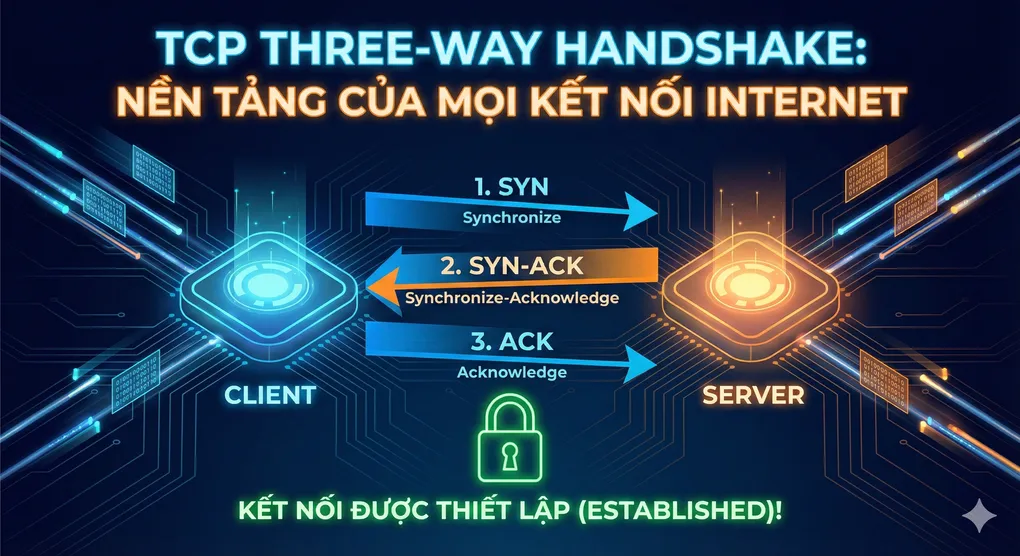
TCP Three-Way Handshake: Nền tảng của mọi Kết nối Internet
Giới thiệu
Mỗi khi bạn mở trình duyệt và truy cập một website, check email, hay download một file, có một “cuộc trò chuyện” cực kỳ quan trọng diễn ra giữa máy tính của bạn và server. Cuộc trò chuyện này được gọi là TCP Three-Way Handshake - một trong những khái niệm nền tảng nhất của networking mà mọi developer phải hiểu.
Trong 10 năm làm việc với distributed systems, tôi đã gặp vô số bugs và performance issues có nguồn gốc từ việc không hiểu rõ TCP handshake. Từ connection timeouts đến slow API responses, nhiều vấn đề có thể được giải quyết khi bạn thực sự hiểu những gì đang xảy ra ở tầng transport.
Hôm nay, chúng ta sẽ mổ xẻ từng bước của TCP handshake, tại sao nó cần thiết, và quan trọng hơn - làm thế nào để optimize nó.
Khái niệm Cốt lõi
TCP: Connection-Oriented Protocol
TCP (Transmission Control Protocol) là giao thức connection-oriented, nghĩa là trước khi truyền dữ liệu, cần phải thiết lập một “connection” giữa client và server. Đây là điểm khác biệt cơ bản so với UDP (connectionless).
Analogy của Cuộc gọi Điện thoại:
TCP giống như một cuộc gọi điện thoại:
- Bạn bấm số (SYN)
- Điện thoại bên kia đổ chuông và người ta nhấc máy “Alo?” (SYN-ACK)
- Bạn nói “Xin chào, mình là…” (ACK)
- Bây giờ hai bên có thể trò chuyện (Data Transfer)
Nếu không có bước 2-3, bạn không biết người kia có sẵn sàng nghe không!
Tại sao cần Handshake?
3 mục đích chính:
1. Verify Connection Availability:
- Client cần biết server có đang online không?
- Port có đang open không?
- Firewall có block không?
2. Synchronize Sequence Numbers:
- Mỗi bên cần biết số thứ tự ban đầu (ISN - Initial Sequence Number)
- Để track packets và đảm bảo đúng thứ tự delivery
3. Negotiate Parameters:
- Window size (flow control)
- Maximum Segment Size (MSS)
- Timestamp options
- SACK (Selective Acknowledgment)
Technical Deep Dive
Ba Bước của Three-Way Handshake
Client                                    Server
  |                                         |
  |  1. SYN (seq=x)                        |
  |  ------>                               |
  |         "Xin chào, tôi muốn kết nối"   |
  |                                         |
  |         2. SYN-ACK (seq=y, ack=x+1)    |
  |                                <------ |
  |  "OK, tôi sẵn sàng. Xin chào ngược lại"|
  |                                         |
  |  3. ACK (seq=x+1, ack=y+1)            |
  |  ------>                               |
  |         "Tốt, bắt đầu gửi data nhé"    |
  |                                         |
  |  === CONNECTION ESTABLISHED ===        |
  |                                         |
  |  4. Data Transfer                      |
  |  <----->                               |
[Insert Diagram: TCP Three-Way Handshake Sequence]
Bước 1: SYN (Synchronize)
Client → Server
TCP Header Fields:
┌────────────────────────────────┐
│ Source Port: 54321             │
│ Dest Port: 80 (HTTP)           │
│ Sequence Number: 1000 (random) │
│ Ack Number: 0                  │
│ Flags: SYN = 1                 │
│ Window Size: 65535             │
│ Options: MSS=1460              │
└────────────────────────────────┘
Ý nghĩa:
- SYN flag = 1: “Tôi muốn synchronize/thiết lập connection”
- Sequence Number = 1000: ISN ngẫu nhiên (tránh replay attacks)
- Window Size: Client có thể receive 65535 bytes
- MSS Option: Client có thể nhận segments tối đa 1460 bytes
Security Note: ISN ngẫu nhiên là quan trọng! Nếu predictable, attacker có thể thực hiện TCP sequence prediction attacks.
Bước 2: SYN-ACK (Synchronize-Acknowledge)
Server → Client
TCP Header Fields:
┌────────────────────────────────┐
│ Source Port: 80                │
│ Dest Port: 54321               │
│ Sequence Number: 5000 (random) │
│ Ack Number: 1001 (1000 + 1)    │
│ Flags: SYN = 1, ACK = 1        │
│ Window Size: 43690             │
│ Options: MSS=1460              │
└────────────────────────────────┘
Ý nghĩa:
- SYN flag = 1: “Tôi cũng muốn synchronize”
- ACK flag = 1: “Tôi đã nhận được SYN của bạn”
- Ack Number = 1001: “Tôi mong đợi byte tiếp theo là 1001”
- Sequence Number = 5000: ISN của server (độc lập với client)
Quan trọng: Server đang ở trạng thái SYN-RECEIVED và đợi ACK cuối cùng.
Bước 3: ACK (Acknowledge)
Client → Server
TCP Header Fields:
┌────────────────────────────────┐
│ Source Port: 54321             │
│ Dest Port: 80                  │
│ Sequence Number: 1001          │
│ Ack Number: 5001 (5000 + 1)    │
│ Flags: ACK = 1                 │
│ Window Size: 65535             │
└────────────────────────────────┘
Ý nghĩa:
- ACK flag = 1: “Tôi đã nhận được SYN-ACK của bạn”
- Ack Number = 5001: “Tôi mong đợi byte tiếp theo từ bạn là 5001”
- Sequence Number = 1001: Tiếp tục từ ISN + 1
Connection established! Giờ cả hai bên có thể gửi data.
State Diagram của TCP Connection
Client States:              Server States:
CLOSED                      CLOSED
  ↓ (active open)             ↓ (passive open, listen)
SYN-SENT                    LISTEN
  ↓ (recv SYN-ACK)            ↓ (recv SYN)
ESTABLISHED ←─────────────→ SYN-RECEIVED
  ↓                           ↓ (recv ACK)
  └─────────────────────────→ ESTABLISHED
Timing Analysis: Cost của Handshake
Latency Breakdown:
# Giả sử RTT (Round Trip Time) = 50ms

def calculate_handshake_time(rtt_ms: float):
    """
    Calculate total time for TCP handshake
    """
    # Step 1: Client → Server (SYN)
    step1 = rtt_ms / 2  # One-way trip: 25ms

    # Step 2: Server → Client (SYN-ACK)
    step2 = rtt_ms / 2  # One-way trip: 25ms

    # Step 3: Client → Server (ACK)
    # Có thể được gửi cùng với data đầu tiên!
    step3 = rtt_ms / 2  # One-way trip: 25ms

    # Total = 1.5 RTT
    total_handshake = step1 + step2 + step3

    return {
        'handshake_time': total_handshake,
        'rtt': rtt_ms,
        'multiplier': total_handshake / rtt_ms
    }

# Examples:
scenarios = [
    ('Localhost', 1),
    ('Same City', 10),
    ('Same Country', 50),
    ('Cross-Continent', 150),
    ('Satellite', 600),
]

print("TCP Handshake Latency Analysis:\n")
for location, rtt in scenarios:
    result = calculate_handshake_time(rtt)
    print(f"{location:20} RTT: {rtt:4}ms → Handshake: {result['handshake_time']:6.1f}ms")

"""
Output:
Localhost            RTT:    1ms → Handshake:    1.5ms
Same City            RTT:   10ms → Handshake:   15.0ms
Same Country         RTT:   50ms → Handshake:   75.0ms
Cross-Continent      RTT:  150ms → Handshake:  225.0ms
Satellite            RTT:  600ms → Handshake:  900.0ms
"""
Insight quan trọng: Mỗi TCP connection mất 1.5 RTT chỉ để handshake! Đây là lý do:
- HTTP/1.1 keep-alive được phát minh
- HTTP/2 multiplexing quan trọng
- Connection pooling là best practice
Code Implementation
Ví dụ 1: Raw Socket Programming - Capture Handshake (Python)
# tcp_handshake_capture.py
import socket
import struct
import time
from typing import Dict, Tuple

class TCPHandshakeAnalyzer:
    def __init__(self):
        self.handshake_stats = []

    def create_connection_with_timing(
        self,
        host: str,
        port: int
    ) -> Dict:
        """
        Create TCP connection và measure handshake time
        """
        start_time = time.perf_counter()

        try:
            # Create socket
            sock = socket.socket(socket.AF_INET, socket.SOCK_STREAM)
            sock.settimeout(5.0)

            # Đo thời gian connect (bao gồm handshake)
            connect_start = time.perf_counter()
            sock.connect((host, port))
            handshake_time = (time.perf_counter() - connect_start) * 1000

            # Get connection info
            local_addr = sock.getsockname()
            remote_addr = sock.getpeername()

            result = {
                'success': True,
                'handshake_time_ms': round(handshake_time, 2),
                'local_port': local_addr[1],
                'remote_ip': remote_addr[0],
                'remote_port': remote_addr[1],
                'timestamp': time.time(),
            }

            sock.close()
            return result

        except socket.timeout:
            return {
                'success': False,
                'error': 'Connection timeout (handshake failed)',
                'handshake_time_ms': None,
            }
        except ConnectionRefusedError:
            return {
                'success': False,
                'error': 'Connection refused (port closed or firewall)',
                'handshake_time_ms': None,
            }
        except Exception as e:
            return {
                'success': False,
                'error': str(e),
                'handshake_time_ms': None,
            }

    def test_multiple_connections(
        self,
        host: str,
        port: int,
        count: int = 10
    ):
        """
        Test multiple connections để tính avg handshake time
        """
        print(f"🔍 Testing TCP handshake to {host}:{port}")
        print(f"Running {count} connection attempts...\n")

        successful_handshakes = []

        for i in range(count):
            result = self.create_connection_with_timing(host, port)

            if result['success']:
                time_ms = result['handshake_time_ms']
                successful_handshakes.append(time_ms)
                print(f"✅ Connection {i+1}: {time_ms:.2f}ms")
            else:
                print(f"❌ Connection {i+1}: {result['error']}")

            time.sleep(0.1)  # Small delay between attempts

        # Statistics
        if successful_handshakes:
            avg_time = sum(successful_handshakes) / len(successful_handshakes)
            min_time = min(successful_handshakes)
            max_time = max(successful_handshakes)

            print(f"\n📊 Handshake Statistics:")
            print(f"   Success Rate: {len(successful_handshakes)}/{count}")
            print(f"   Average: {avg_time:.2f}ms")
            print(f"   Min: {min_time:.2f}ms")
            print(f"   Max: {max_time:.2f}ms")
            print(f"   Estimated RTT: ~{avg_time * 2/3:.2f}ms")
        else:
            print("❌ All connection attempts failed")

# Usage
if __name__ == "__main__":
    analyzer = TCPHandshakeAnalyzer()

    # Test local connection
    print("=" * 50)
    analyzer.test_multiple_connections('localhost', 80, count=5)

    print("\n" + "=" * 50)
    # Test remote connection
    analyzer.test_multiple_connections('google.com', 443, count=5)
Ví dụ 2: TCP Server với Connection Tracking (Node.js)
// tcp-server-with-tracking.ts
import * as net from 'net';

interface ConnectionInfo {
  remoteAddress: string;
  remotePort: number;
  localPort: number;
  connectionId: string;
  connectedAt: Date;
  state: 'ESTABLISHED' | 'CLOSED';
  bytesReceived: number;
  bytesSent: number;
}

class TCPServerWithTracking {
  private server: net.Server;
  private connections: Map<string, ConnectionInfo> = new Map();
  private connectionCounter: number = 0;

  constructor(private port: number) {
    this.server = net.createServer();
    this.setupServerHandlers();
  }

  private setupServerHandlers() {
    // Server listening
    this.server.on('listening', () => {
      console.log(`🚀 TCP Server listening on port ${this.port}`);
      console.log(`📡 Waiting for connections (state: LISTEN)...\n`);
    });

    // New connection (handshake completed!)
    this.server.on('connection', (socket: net.Socket) => {
      this.handleNewConnection(socket);
    });

    // Server error
    this.server.on('error', (error) => {
      console.error(`❌ Server error: ${error.message}`);
    });
  }

  private handleNewConnection(socket: net.Socket) {
    const connectionId = `conn-${++this.connectionCounter}`;

    const connInfo: ConnectionInfo = {
      remoteAddress: socket.remoteAddress || 'unknown',
      remotePort: socket.remotePort || 0,
      localPort: this.port,
      connectionId,
      connectedAt: new Date(),
      state: 'ESTABLISHED',
      bytesReceived: 0,
      bytesSent: 0,
    };

    this.connections.set(connectionId, connInfo);

    console.log(`✅ New connection established (${connectionId})`);
    console.log(`   From: ${connInfo.remoteAddress}:${connInfo.remotePort}`);
    console.log(`   State: SYN-RECEIVED → ESTABLISHED`);
    console.log(`   Total connections: ${this.connections.size}\n`);

    // Handle incoming data
    socket.on('data', (data: Buffer) => {
      connInfo.bytesReceived += data.length;
      console.log(`📩 [${connectionId}] Received ${data.length} bytes`);
      console.log(`   Data: ${data.toString().trim()}`);

      // Echo back
      const response = `Echo: ${data.toString()}`;
      socket.write(response);
      connInfo.bytesSent += response.length;
      console.log(`📤 [${connectionId}] Sent ${response.length} bytes\n`);
    });

    // Connection closed
    socket.on('close', (hadError: boolean) => {
      connInfo.state = 'CLOSED';
      const duration = Date.now() - connInfo.connectedAt.getTime();

      console.log(`👋 Connection closed (${connectionId})`);
      console.log(`   Duration: ${duration}ms`);
      console.log(`   Bytes RX: ${connInfo.bytesReceived}`);
      console.log(`   Bytes TX: ${connInfo.bytesSent}`);
      console.log(`   Had error: ${hadError}\n`);

      this.connections.delete(connectionId);
    });

    // Handle errors
    socket.on('error', (error) => {
      console.error(`❌ [${connectionId}] Socket error: ${error.message}`);
    });

    // Set timeout
    socket.setTimeout(30000); // 30 seconds
    socket.on('timeout', () => {
      console.log(`⏰ [${connectionId}] Socket timeout, closing...`);
      socket.end();
    });
  }

  start() {
    // Start listening (passive open)
    this.server.listen(this.port);
  }

  stop() {
    console.log('🛑 Stopping server...');
    this.server.close(() => {
      console.log('✅ Server stopped');
    });
  }

  getConnectionStats() {
    return {
      activeConnections: this.connections.size,
      totalConnectionsHandled: this.connectionCounter,
      connections: Array.from(this.connections.values()),
    };
  }
}

// Usage
const server = new TCPServerWithTracking(8080);
server.start();

// Print stats every 10 seconds
setInterval(() => {
  const stats = server.getConnectionStats();
  console.log(`📊 Server Stats:`);
  console.log(`   Active: ${stats.activeConnections}`);
  console.log(`   Total handled: ${stats.totalConnectionsHandled}\n`);
}, 10000);

// Graceful shutdown
process.on('SIGINT', () => {
  server.stop();
  process.exit(0);
});
Client để test:
// tcp-client.ts
import * as net from 'net';

class TCPClient {
  connect(host: string, port: number) {
    console.log(`🔌 Initiating connection to ${host}:${port}`);
    console.log(`   State: CLOSED → SYN-SENT\n`);

    const startTime = Date.now();
    const socket = new net.Socket();

    socket.connect(port, host, () => {
      const handshakeTime = Date.now() - startTime;
      console.log(`✅ Connection established!`);
      console.log(`   Handshake time: ${handshakeTime}ms`);
      console.log(`   State: SYN-SENT → ESTABLISHED\n`);

      // Send test message
      socket.write('Hello from TCP client!\n');
    });

    socket.on('data', (data: Buffer) => {
      console.log(`📩 Received: ${data.toString()}`);

      // Close after receiving echo
      setTimeout(() => {
        console.log(`\n👋 Closing connection...`);
        socket.end();
      }, 1000);
    });

    socket.on('close', () => {
      console.log(`✅ Connection closed\n`);
    });

    socket.on('error', (error) => {
      console.error(`❌ Error: ${error.message}`);
    });
  }
}

const client = new TCPClient();
client.connect('localhost', 8080);
Ví dụ 3: Monitoring TCP Connections (Linux tcpdump)
# Capture TCP handshake packets
sudo tcpdump -i any -nn 'tcp[tcpflags] & (tcp-syn|tcp-ack) != 0' -c 20

# Output example:
# 15:30:45.123456 IP 192.168.1.100.54321 > 93.184.216.34.80: Flags [S], seq 1000
# 15:30:45.173456 IP 93.184.216.34.80 > 192.168.1.100.54321: Flags [S.], seq 5000, ack 1001
# 15:30:45.173500 IP 192.168.1.100.54321 > 93.184.216.34.80: Flags [.], ack 5001

# Flags:
# [S] = SYN
# [S.] = SYN-ACK
# [.] = ACK
Python wrapper để parse tcpdump:
import subprocess
import re
from datetime import datetime

def capture_handshakes(duration: int = 10):
    """
    Capture TCP handshakes và analyze
    """
    cmd = [
        'sudo', 'tcpdump',
        '-i', 'any',
        '-nn',
        'tcp[tcpflags] & (tcp-syn|tcp-ack) != 0',
        '-c', '100'
    ]

    print(f"🔍 Capturing TCP handshakes for {duration} seconds...\n")

    try:
        process = subprocess.Popen(
            cmd,
            stdout=subprocess.PIPE,
            stderr=subprocess.PIPE,
            text=True
        )

        handshakes = {}

        for line in process.stdout:
            # Parse tcpdump output
            match = re.search(
                r'(\d+\.\d+\.\d+\.\d+)\.(\d+) > (\d+\.\d+\.\d+\.\d+)\.(\d+): Flags \[(.+?)\]',
                line
            )

            if match:
                src_ip, src_port, dst_ip, dst_port, flags = match.groups()
                conn_key = f"{src_ip}:{src_port}-{dst_ip}:{dst_port}"

                if conn_key not in handshakes:
                    handshakes[conn_key] = []

                handshakes[conn_key].append({
                    'flags': flags,
                    'time': datetime.now()
                })

                print(f"📦 {src_ip}:{src_port} → {dst_ip}:{dst_port} [{flags}]")

        # Analyze complete handshakes
        complete_handshakes = 0
        for conn, packets in handshakes.items():
            flags = [p['flags'] for p in packets]
            if 'S' in flags and 'S.' in flags and '.' in flags:
                complete_handshakes += 1

        print(f"\n📊 Summary:")
        print(f"   Total connections: {len(handshakes)}")
        print(f"   Complete handshakes: {complete_handshakes}")

    except KeyboardInterrupt:
        print("\n🛑 Stopped")
    except Exception as e:
        print(f"❌ Error: {e}")

if __name__ == "__main__":
    capture_handshakes()
Performance Optimization
1. TCP Fast Open (TFO)
Problem: Handshake mất 1 RTT trước khi gửi data
Solution: TCP Fast Open cho phép gửi data trong SYN packet!
Traditional:                 TCP Fast Open:
Client → Server: SYN         Client → Server: SYN + Data
Server → Client: SYN-ACK     Server → Client: SYN-ACK + Response
Client → Server: ACK         Client → Server: ACK
Client → Server: Data
Server → Client: Response    Savings: 1 RTT!
Enable TFO (Linux):
# Check if TFO is enabled
cat /proc/sys/net/ipv4/tcp_fastopen
# 0 = disabled
# 1 = client only
# 2 = server only
# 3 = both

# Enable TFO
sudo sysctl -w net.ipv4.tcp_fastopen=3
Python code với TFO:
import socket

# Client side
sock = socket.socket(socket.AF_INET, socket.SOCK_STREAM)
sock.setsockopt(socket.IPPROTO_TCP, socket.TCP_FASTOPEN, 5)

# Gửi data ngay trong SYN!
data = b'GET / HTTP/1.1\r\nHost: example.com\r\n\r\n'
sock.sendto(data, socket.MSG_FASTOPEN, ('example.com', 80))
2. Connection Pooling
Problem: Mỗi request mới = 1 handshake mới = 1.5 RTT wasted
Solution: Reuse connections!
import requests
from requests.adapters import HTTPAdapter
from urllib3.util.retry import Retry

# Create session with connection pooling
session = requests.Session()

# Configure adapter
adapter = HTTPAdapter(
    pool_connections=10,  # Number of connection pools
    pool_maxsize=20,      # Max connections per pool
    max_retries=Retry(
        total=3,
        backoff_factor=0.3,
    )
)

session.mount('http://', adapter)
session.mount('https://', adapter)

# Reuse connections
for i in range(100):
    response = session.get('http://example.com')
    # Chỉ handshake 1 lần cho tất cả 100 requests!
3. HTTP/2 Multiplexing
Problem: HTTP/1.1 = 1 connection = 1 request at a time
Solution: HTTP/2 multiplex nhiều requests trên 1 connection
HTTP/1.1:                    HTTP/2:
Handshake (75ms)             Handshake (75ms)
Request 1                    Request 1, 2, 3, 4, 5
Wait...                      (parallel!)
Request 2
Wait...                      Total: 75ms + data transfer
Request 3
...
Total: 75ms * 5 + data
Kết luận
TCP Three-Way Handshake là một trong những khái niệm nền tảng nhất của networking. Hiểu rõ nó giúp bạn:
Key Takeaways:
- Handshake cost = 1.5 RTT - significant cho high-latency connections
- 3 bước: SYN → SYN-ACK → ACK - thiết lập connection và sync sequence numbers
- Security implications - random ISN ngăn chặn sequence prediction attacks
- Optimization strategies:
- TCP Fast Open (gửi data trong SYN)
- Connection pooling (reuse connections)
- HTTP/2+ multiplexing (chia sẻ connections)
Lời khuyên từ kinh nghiệm:
“Mỗi connection tốn 1.5 RTT. Với 150ms RTT, đó là 225ms chỉ để handshake! Optimize by connection reuse, not by making handshake faster.”
Best Practices:
- ✅ Dùng connection pooling cho API clients
- ✅ Enable keep-alive trong HTTP servers
- ✅ Monitor handshake latency (add metrics!)
- ✅ Use HTTP/2+ khi có thể
- ✅ Consider TCP Fast Open cho low-latency critical apps
Remember: Handshake là unavoidable cost của reliability. Nếu bạn không cần reliability, hãy dùng UDP!
Tài liệu tham khảo:
- RFC 793: Transmission Control Protocol
- RFC 7413: TCP Fast Open
- “TCP/IP Illustrated, Volume 1” by W. Richard Stevens
- Linux Kernel TCP Implementation
Về tác giả: Senior Software Engineer với 10+ năm kinh nghiệm optimize network performance cho distributed systems. Đam mê low-level networking và performance engineering.